
Deleting an app does not automatically cancel its subscription. Cancel through the company that bills you, then check that renewal has stopped before treating the job as done.
An app disappearing from the phone feels final. The billing agreement can carry on quite happily without it. Apple explicitly warns about this, and Google gives the same warning for apps uninstalled from Android. A tidier screen is not a cancellation receipt.
Find who takes the payment
Start with the purchase receipt or the charge on your statement. You are looking for the billing company and the account used to subscribe. The app’s name alone may not tell you where the subscription is managed.
An app used on an iPhone is not necessarily billed by Apple. A subscription bought from a service’s website may need to be canceled with that service. Likewise, an empty subscription list is not proof that nothing is being charged. Check whether the purchase belongs to another account before declaring victory.
See how this works: where to cancel
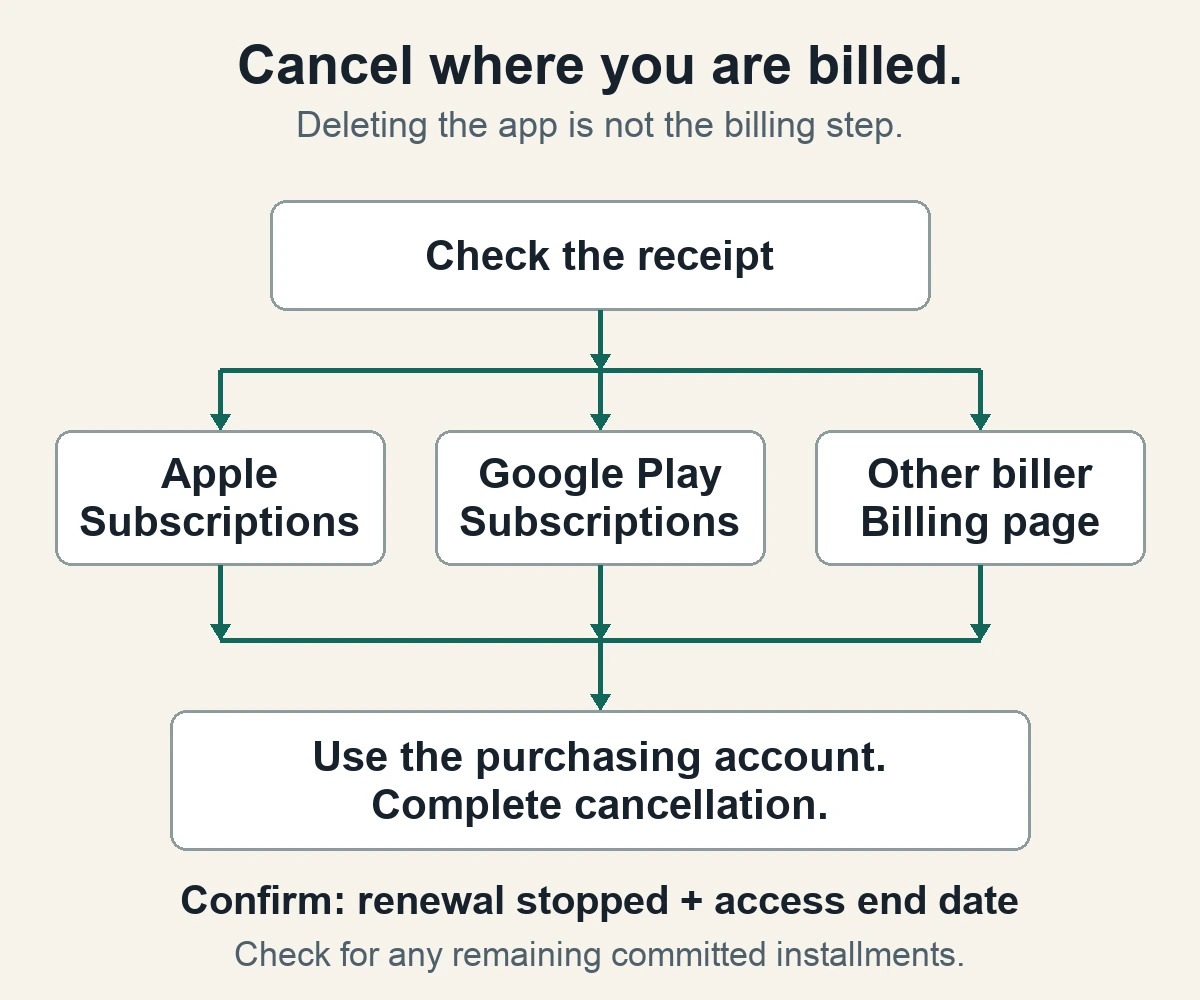
Cancel in the right place
For Apple billing: On an iPhone or iPad, open Settings, tap your name, then Subscriptions. Open the relevant subscription and choose Cancel Subscription. Apple’s cancellation guide says that an expiration message, or no cancellation button on the subscription, indicates it is already canceled.
For Google Play billing: Open Google Play subscriptions while signed into the account used to pay. Select the subscription, choose Cancel subscription, and complete the remaining prompts. Google’s cancellation guide covers the process and what happens afterward.
For direct billing: Use the provider’s account or billing page and follow its cancellation instructions. If the subscription came through another provider, such as a mobile carrier, start there. Follow the payment, not the icon.
Check what actually changed
Before closing the page, read the final status. Look for confirmation of cancellation and the date access ends. Save the confirmation somewhere you can find it. A screen offering a discount or asking why you are leaving is still part of the process.
For a typical paid Google Play subscription, cancellation leaves access available for the period already purchased. Continued access therefore does not, by itself, mean cancellation failed. Refund eligibility is a separate question; use the billing provider’s refund process if that is what you need.
Two Google Play exceptions matter: prepaid plans expire automatically, while payment plans can leave committed installments due after you stop renewal. “Will not renew” and “nothing more to pay” are not always the same statement. Read the remaining-payment schedule before assuming a later charge is an error.
If the subscription is missing, compare the account shown on the receipt with the one currently signed in. Apple’s guide says a subscription bought on a family member’s account must be canceled by that family member. If cancellation is confirmed but a later charge appears, compare the billed period and remaining installments, then contact the billing provider with the saved confirmation. Do not assume deleting the account or removing the app resolves the charge.
Trials deserve a deadline check. Apple advises canceling at least 24 hours before a trial ends if you do not want it to renew. For other providers, read the trial’s stated cancellation terms instead of assuming the last minute is safe.
We suggest keeping a small record of the service, billing provider, renewal date and cancellation confirmation. It is less satisfying than deleting six unused apps in one sweep, but it answers the question that matters: which payments are still scheduled?
Once cancellation is confirmed, remove the app if you no longer want it. The useful order is billing first, housekeeping second.
Read next