
A shared link can fail even when it looks complete. The link points to a file. It does not, by itself, decide who may open it.
That distinction matters when a page asks someone to sign in or request access. Resending the same URL usually does nothing. The useful question is not “Is the link broken?” It is “What audience did this link grant access to?”
The link and the rule are different
Google Drive distinguishes between Restricted access and Anyone with the link. On work or school accounts, an administrator can limit external sharing. Drive also documents that folder access can be inherited, so changing one file may not produce the narrower rule someone expected.
OneDrive makes the distinction unusually clear. A “People with existing access” link grants nothing new. It is only a route back to a file for people who already have permission. A “Specific people” link works only for the people chosen by the sender. Where external sharing is allowed, Microsoft says an invited person without a Microsoft account can be verified with a one-time code sent to their email.
Those labels vary, but the diagnosis is the same. First, identify the account that should have access. Then have the owner open the sharing panel and compare the audience with that account. A forwarded link is not evidence that the recipient belongs to its audience.
See how this works: a shared-link access check
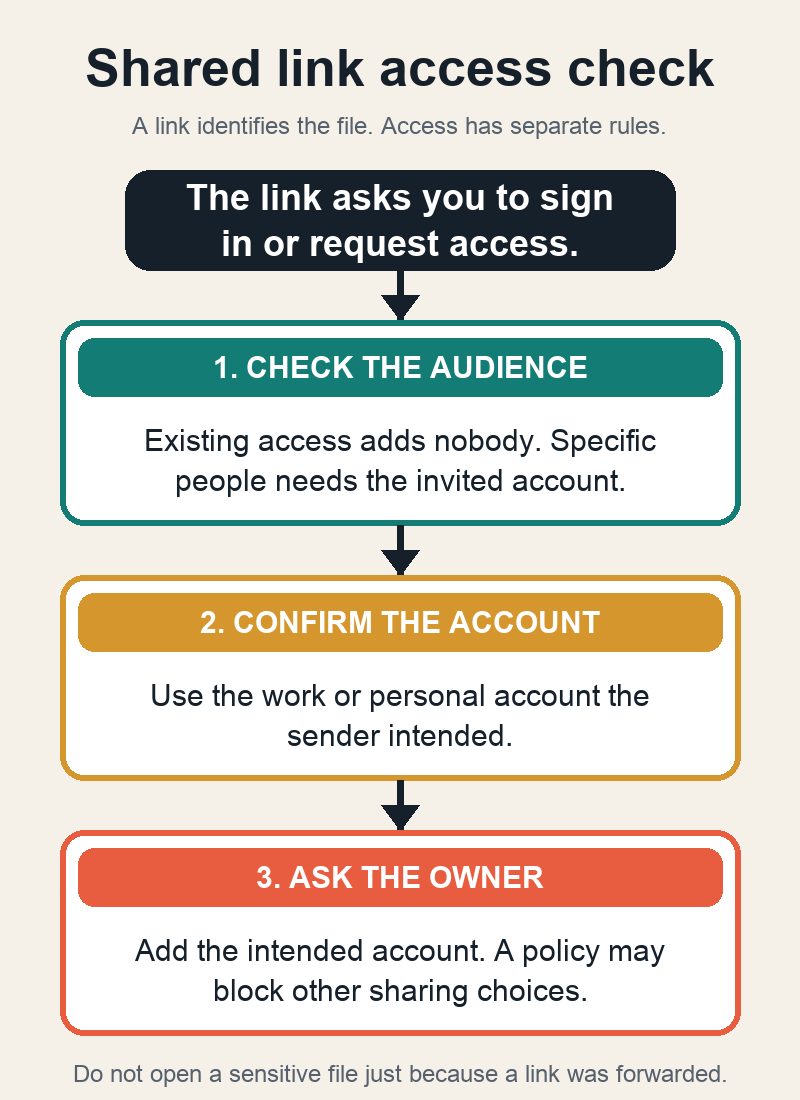
A small access check
- Use the exact account that the sender intended. A personal account and a work account can be different people as far as the service is concerned.
- Ask the owner which audience is selected: existing access, specific people, an organization, or anyone with the link.
- If the link is for existing access or specific people, add the intended account or ask the owner to do so. Do not change a sensitive file to an open link just to make a forwarded URL work.
- Open the link again from the intended account and confirm the needed level, such as view or edit, rather than merely confirming that a page loads.
The finish line is specific: the intended recipient can open the item in the intended account with the intended permission. The fix does not revoke copies, downloads, or access granted through another group or parent folder. It also cannot create a sharing option that an organization has disabled.
If the expected account still cannot open the file, the sender may not own the item or may lack permission to manage access. Ask the owner to review the sharing panel, or ask the organization’s support path when a policy is involved. Another link is not a remedy for a rule that still says no.